Case study ·
snaplnk.io — Product Case Study
A URL shortener I designed and built solo: short links with auto-generated QR codes, privacy-safe click analytics, a no-code link-in-bio builder, and a secured admin panel with first-party product analytics.
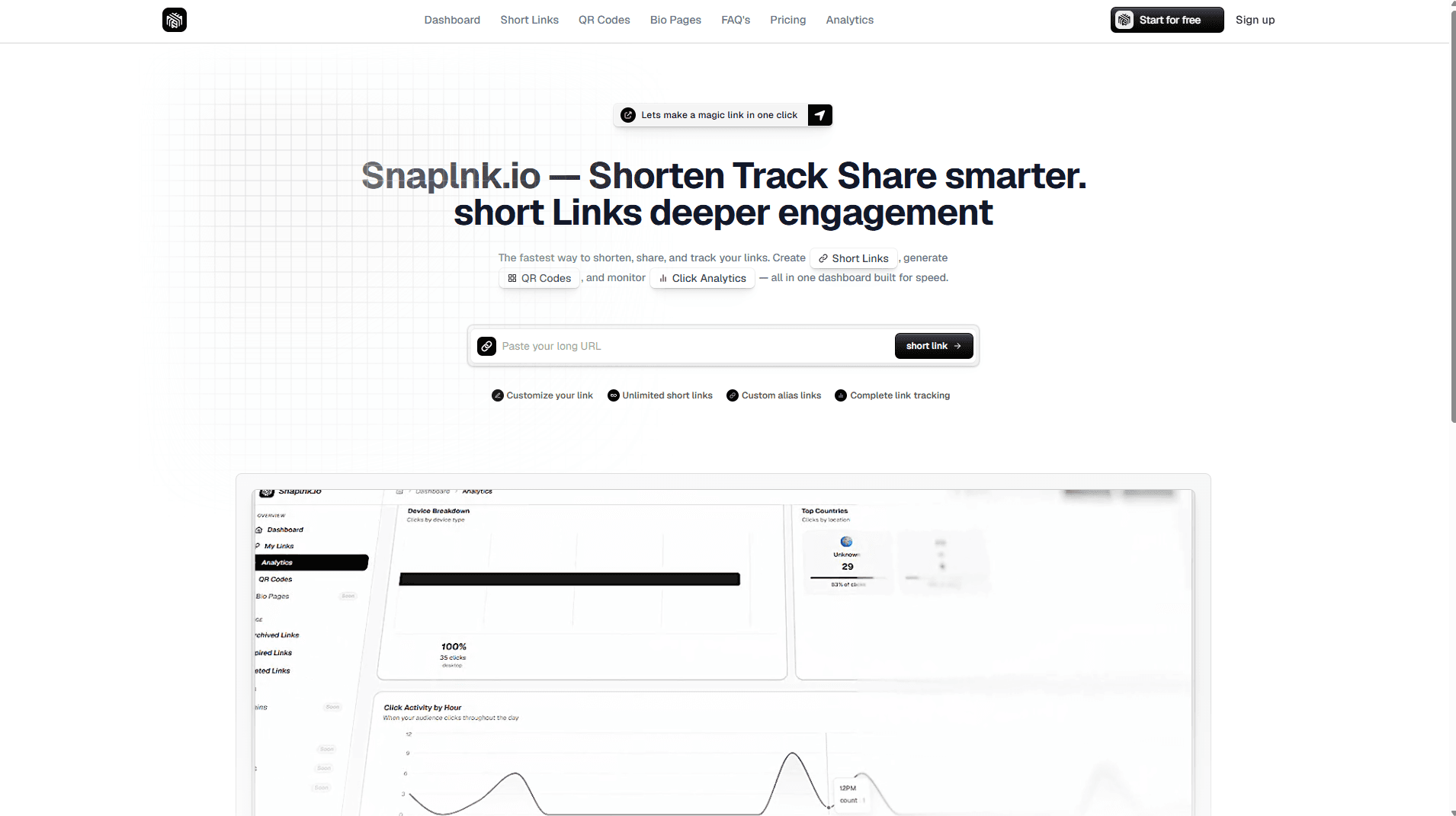
snaplnk.io is a URL shortener I designed and built solo. It covers short links with auto-generated QR codes, privacy-safe click analytics, a no-code link-in-bio page builder, and a secured admin panel with first-party product analytics.
- Role
- Solo founder, designer and full-stack engineer
- Timeline
- Jul 2026 – Nov 2026 (first commit 21 Jul 2026; admin panel shipped 12 Nov 2026)
- Tests
- 14 Vitest suites (~97 test cases) + 3 Supabase RLS / RPC test scripts
- Web stack
- Next.js 16 (App Router,
proxy.ts), React 19, TypeScript, Tailwind CSS v4, shadcn/ui (base-nova), Motion - Backend
- Supabase — Postgres, Auth, Storage, Row-Level Security, RPC functions
- Infra
- Upstash Redis (rate limiting), Cloudinary (QR image hosting), Vercel (hosting + edge geolocation)
- Key libraries
- nanoid, qrcode, ua-parser-js, isbot, Zod v4, Recharts, bcryptjs, date-fns
- Code review
- CodeRabbit AI review on every pull request
Problem and goals
Creators and small businesses juggle separate tools for short links, QR codes, analytics and link-in-bio pages — and most free shorteners are slow, track visitors aggressively, or get abused for phishing.
- Short links, QR codes and bio pages usually live in different products with different logins.
- Free shorteners are a target for spam and phishing, so a public one needs abuse controls from day one.
- Click analytics often store raw IP addresses, which is a privacy liability.
- Link-in-bio builders either lock basic features behind a paywall or let users inject unsafe HTML.
Goals I set for the product
- 1Shorten any URL in one step and get a downloadable QR code automatically.
- 2Count every real click with device, browser, OS, country, city and referrer — but never store raw IPs.
- 3Redirects must stay fast: logging must never slow the 302.
- 4A free, safe link-in-bio builder with themes, templates and blocks, published to
/bio/<username>. - 5Stop abuse: rate limits, URL validation, reserved names and no anonymous link creation.
- 6An admin panel to see users, links, events and errors — without exposing it to anyone else.
Product walkthrough
The product has eight surfaces. The first seven are what every user sees; the admin panel has its own section below.
1. Landing page
A scroll-aware header, a hero with a URL input and feature pills (customize your link, unlimited short links, custom alias links, complete link tracking), an interactive grid background, a trusted-by logo grid and micro-interactions built with Motion. Below the hero, a live preview of the analytics dashboard shows what you get after signing up.
2. Sign-up and sign-in
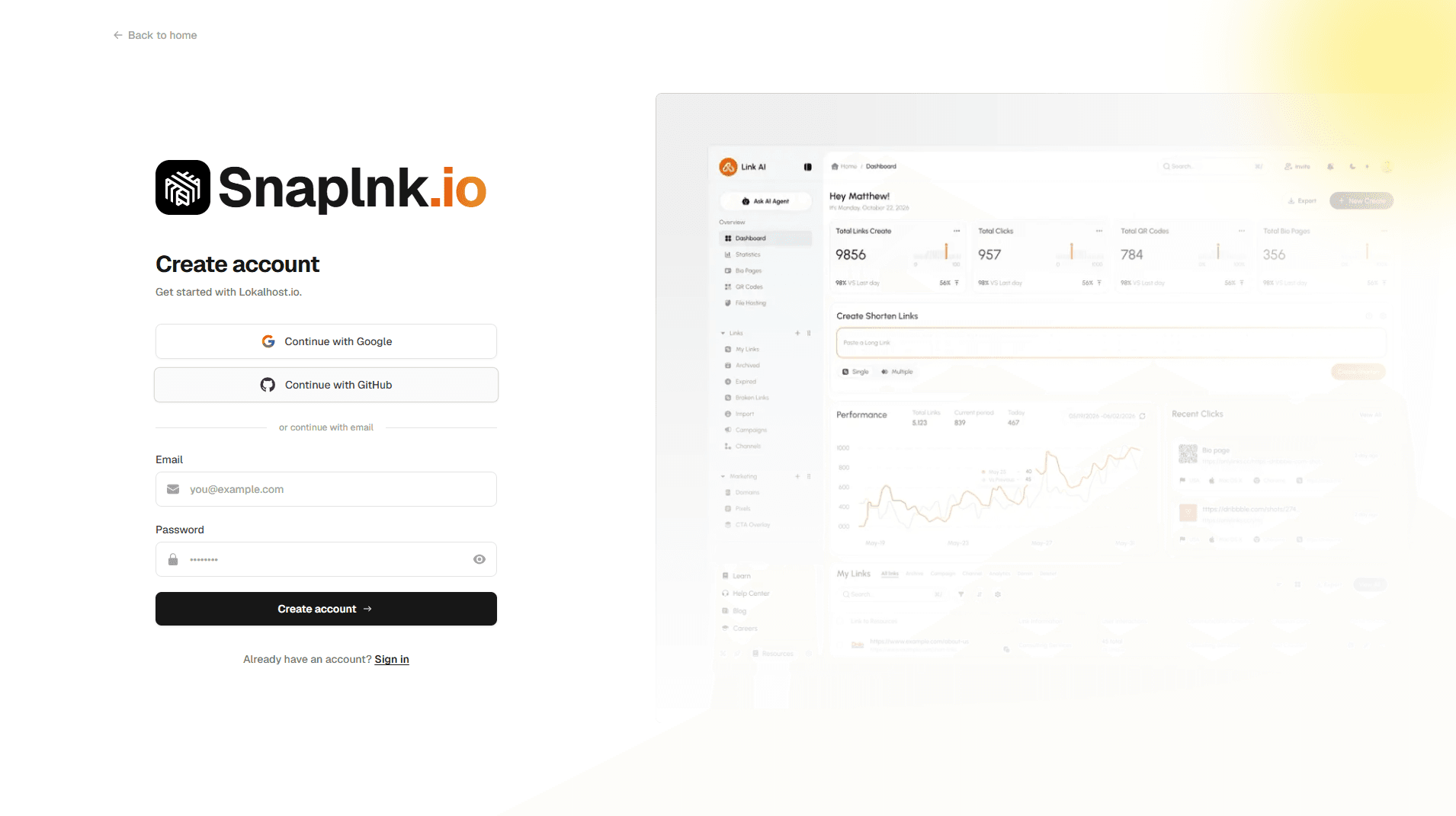
Email + password, Google and GitHub OAuth through Supabase, with a password visibility toggle, friendly auth error messages and a safe return to the page the user came from. The right side previews the product the user is about to get.
3. Dashboard
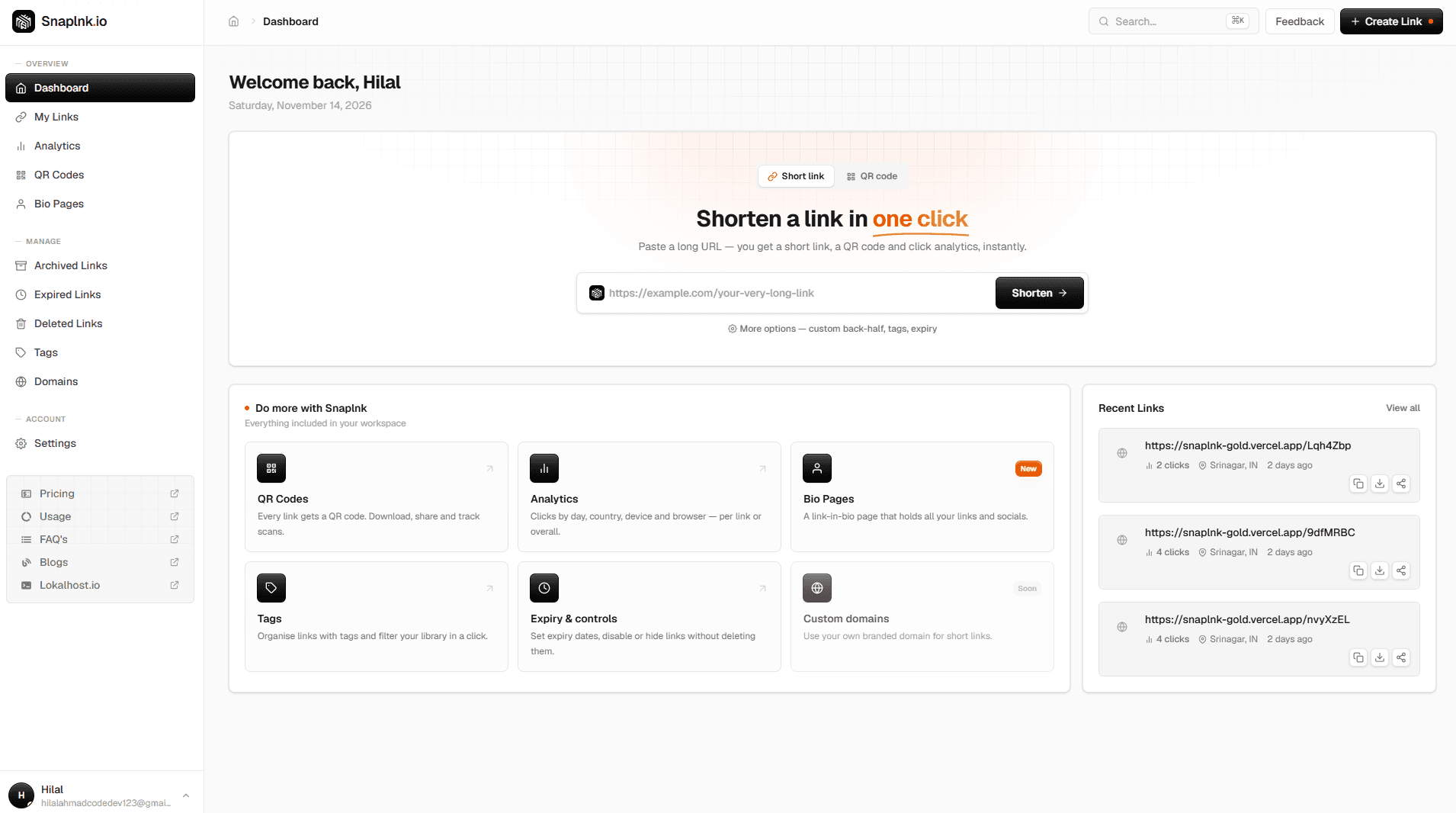
A greeting with the user's name and date, and a “Shorten a link in one click” card with a Short link / QR code switch and a “More options” row for a custom back-half, tags and expiry. Below it, a “Do more with Snaplnk” grid (QR codes, analytics, bio pages, tags, expiry & controls, custom domains) and a Recent Links rail showing clicks, the last click's city and quick copy / download-QR / share actions. Ctrl+K opens a command palette from anywhere.
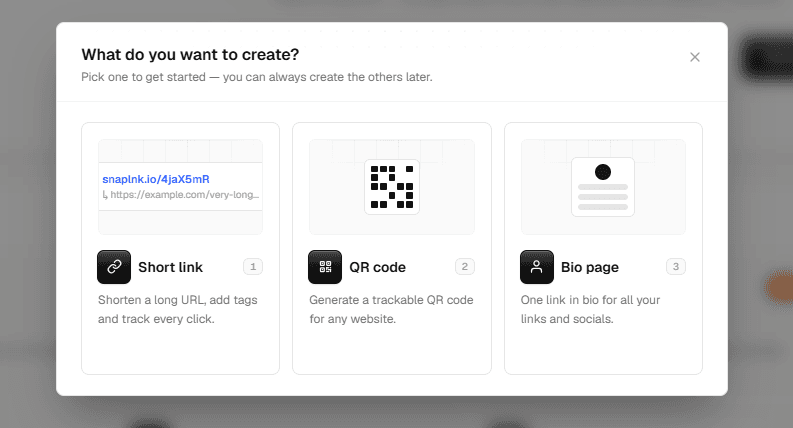
The global Create Link button opens a picker so users can start any of the three products from one place:
4. Link management
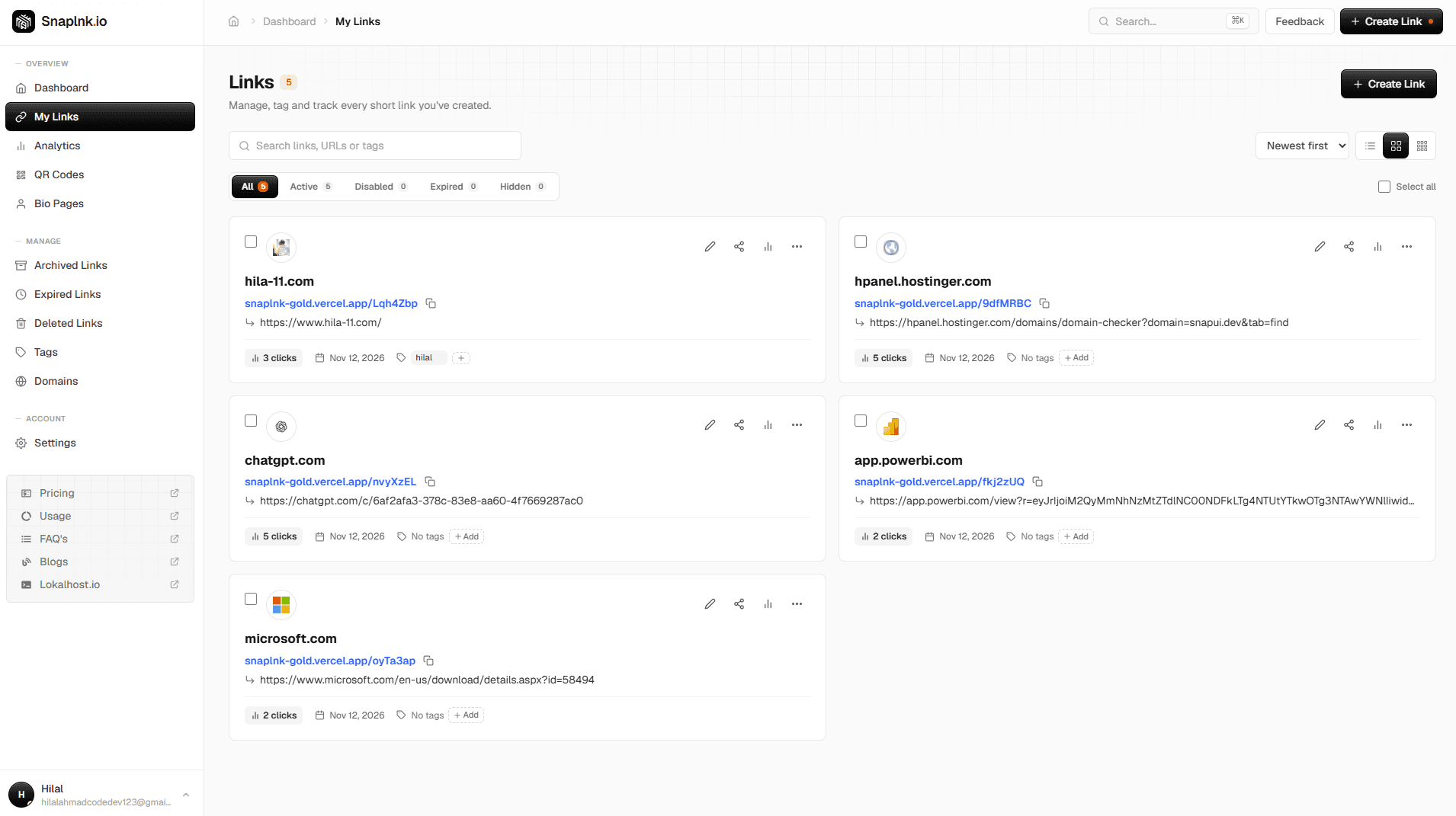
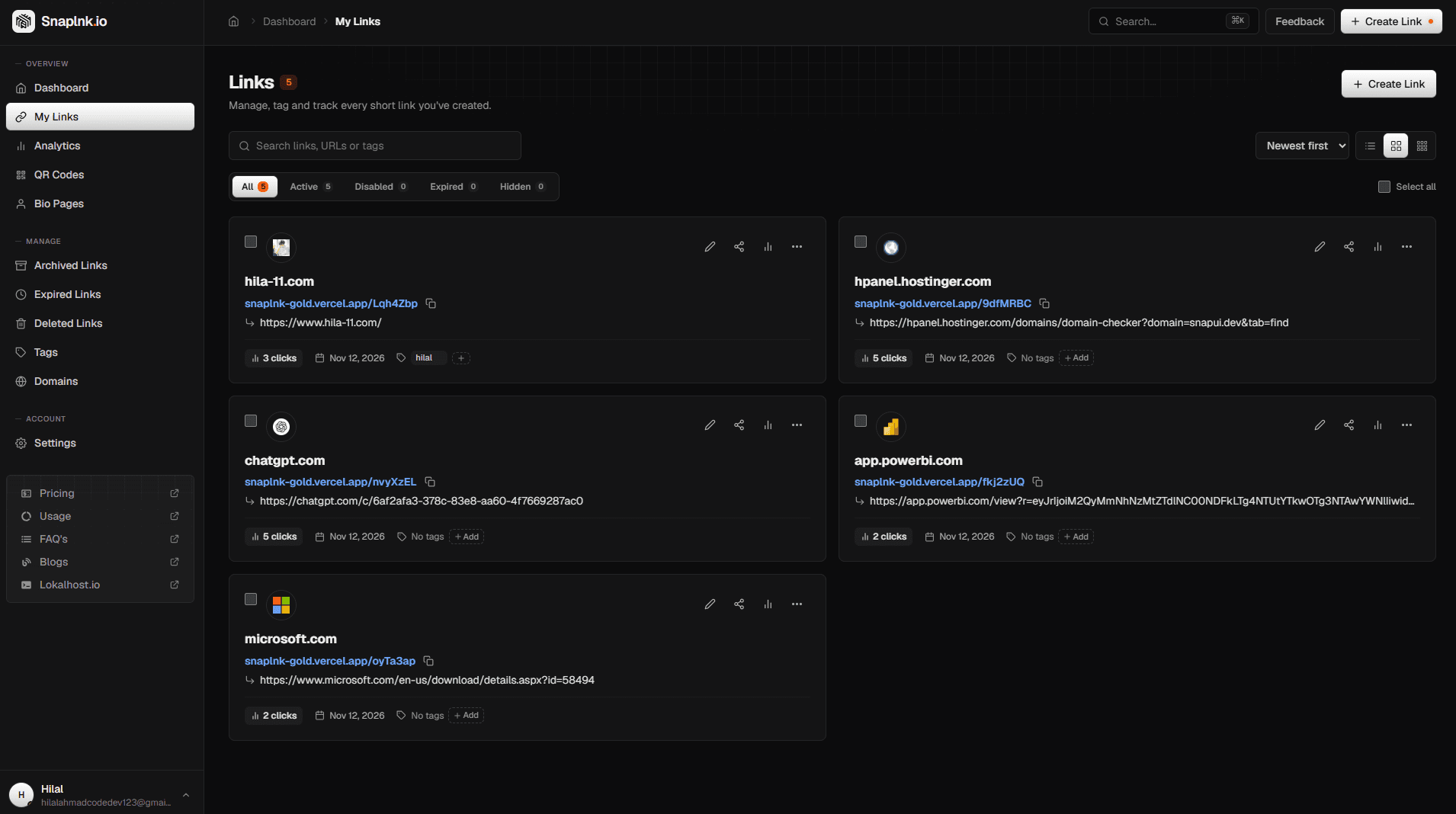
Links are created with a custom alias, title, tags and expiry date. The library has search across links, URLs and tags; status tabs (All, Active, Disabled, Expired, Hidden) with live counts; sorting; list, card and compact views; and bulk selection. Each card shows the destination's favicon, the short link with a copy button, the original URL, click count, created date and inline tags.
Every row can be edited, shared through the Web Share API, opened in analytics, archived, soft-deleted and restored, or have its QR code downloaded as PNG. Archived, Expired and Deleted links each get their own view in the sidebar.
5. Analytics
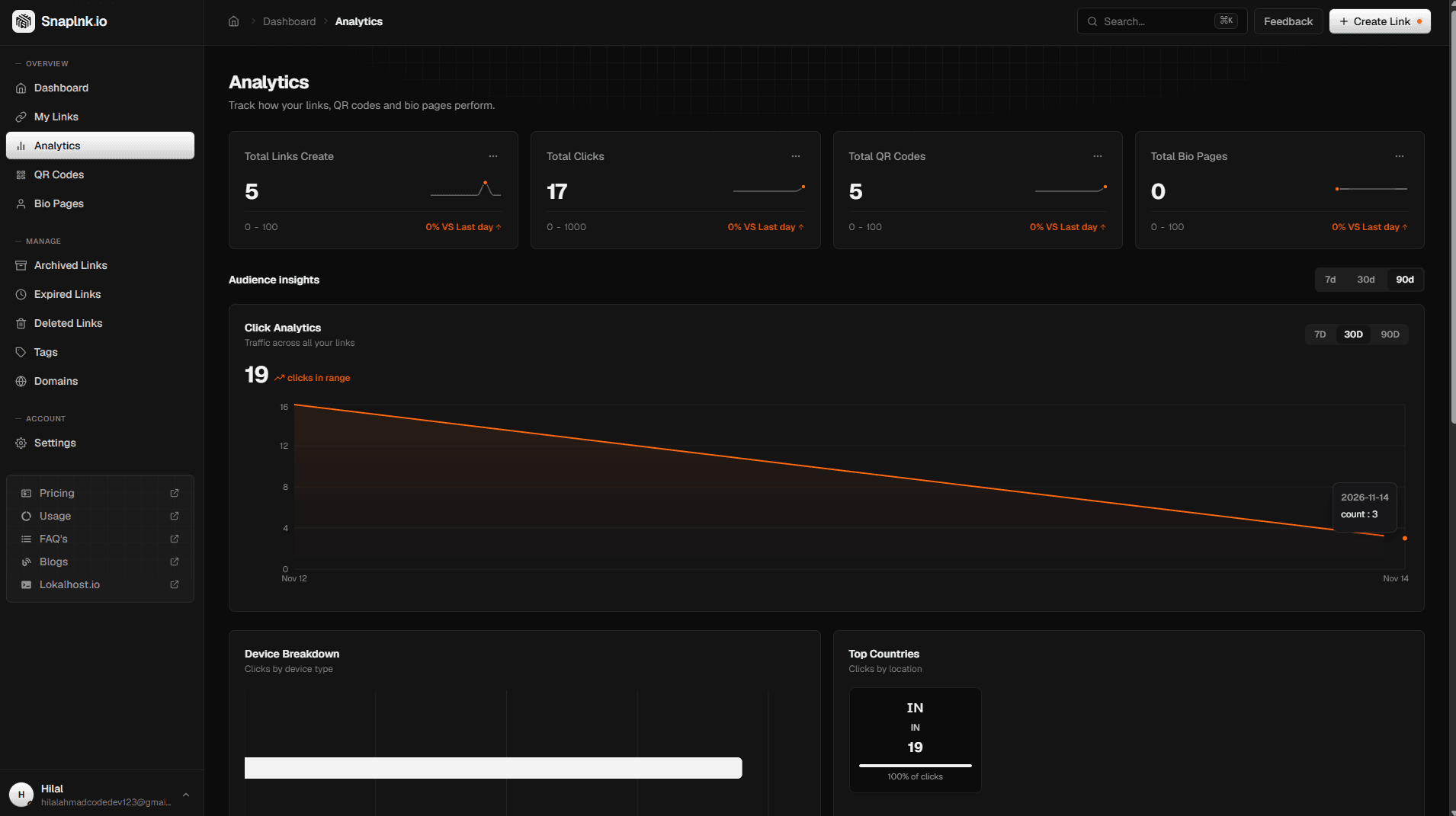
Four stat cards with sparklines and “vs last day” deltas (links created, total clicks, QR codes, bio pages), then audience insights with 7d / 30d / 90d ranges: a click-analytics area chart, device breakdown and top countries. Each link also has its own breakdown by day, device, browser, OS, country, city and referrer.
6. QR codes
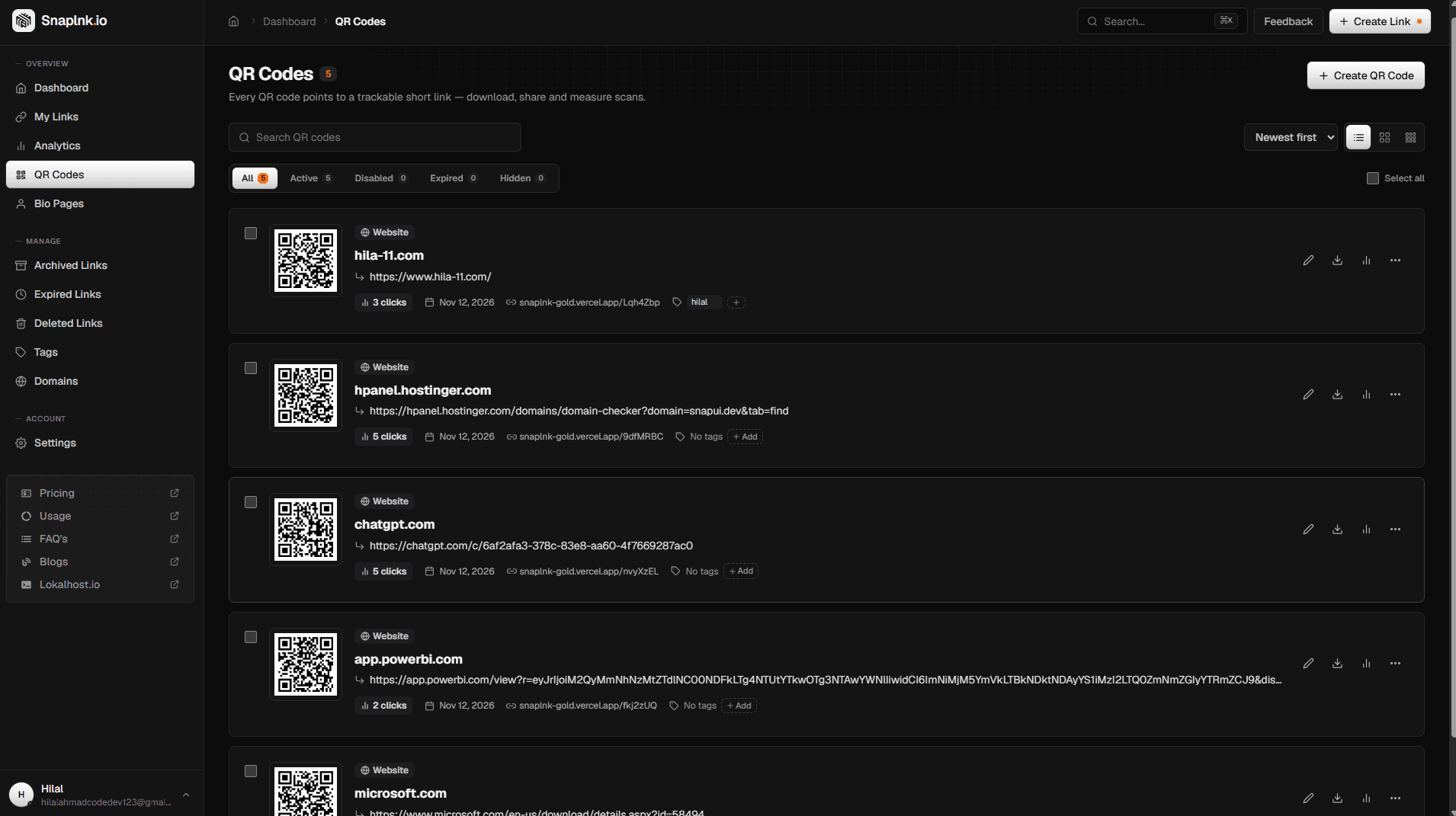
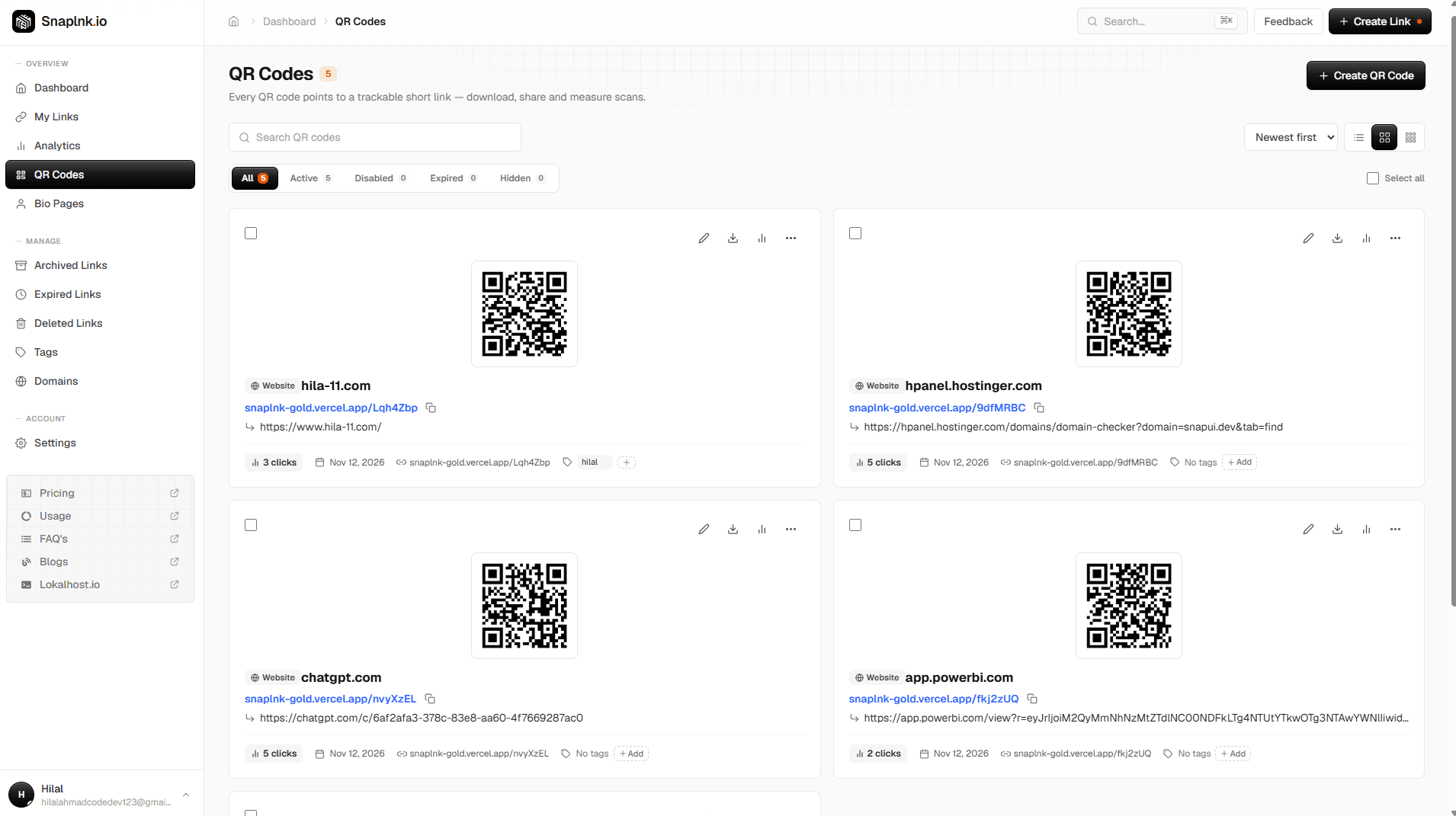
Every link gets a QR code automatically, rendered as a PNG and stored on Cloudinary. The QR library mirrors the links library — search, status tabs, sort, list or grid view — and each code can be downloaded, edited or opened in analytics. Because each QR points at a short link, scans are tracked like clicks.
7. Bio pages
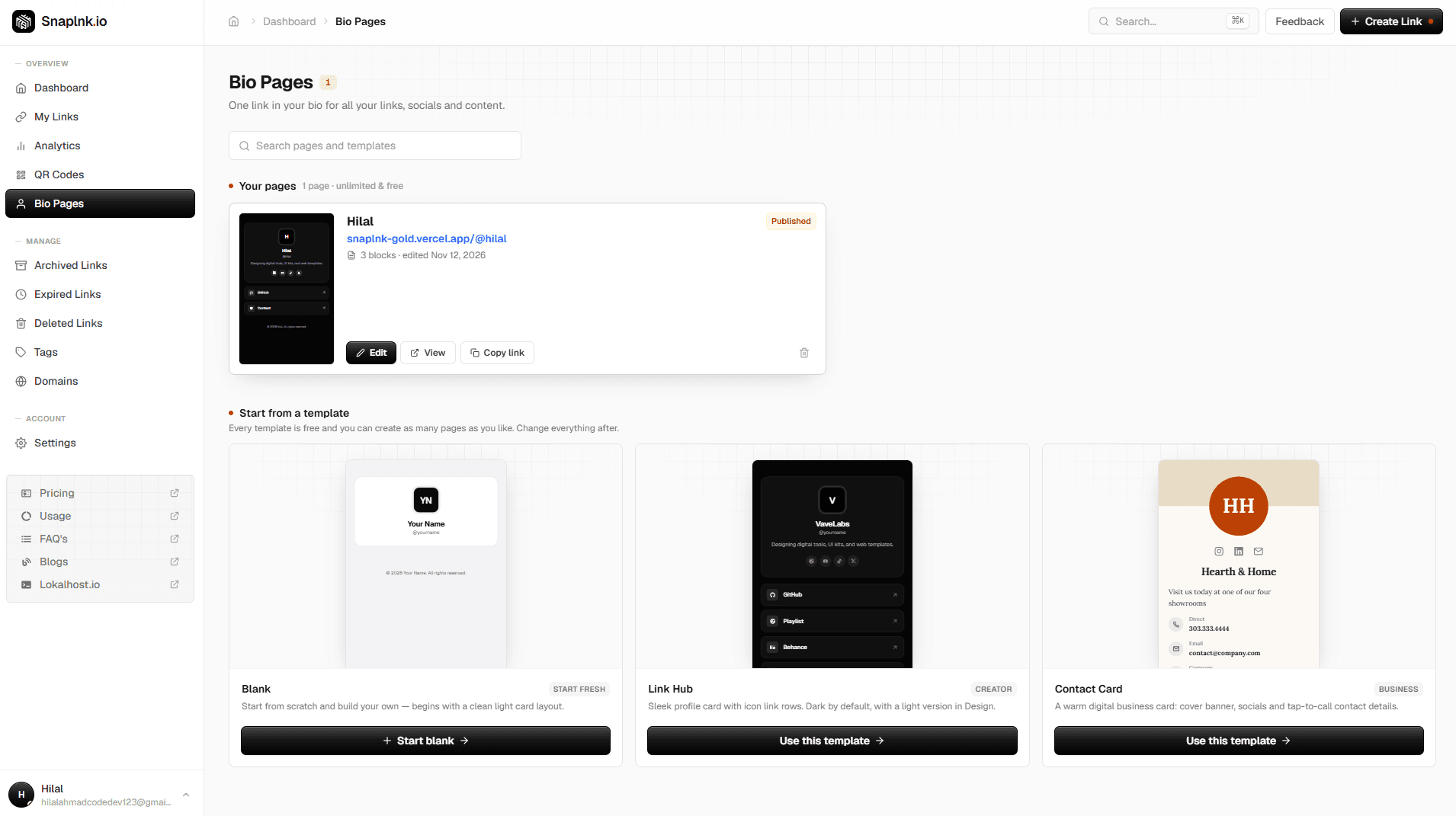
A free link-in-bio builder (“1 page · unlimited & free”). Users start from Blank, Link Hub (a dark creator card with icon link rows) or Contact Card (a business card with a cover banner, socials and tap-to-call details), and claim a username with a live availability check.
The editor has blocks — link, heading, text, divider, social icons, YouTube / Vimeo / Spotify / SoundCloud embeds, and a contact card with vCard download — and a design panel for colours, fonts and button styles, with a live preview. Publish and unpublish are one click, and the published page lives at /@username.
8. Settings and profile
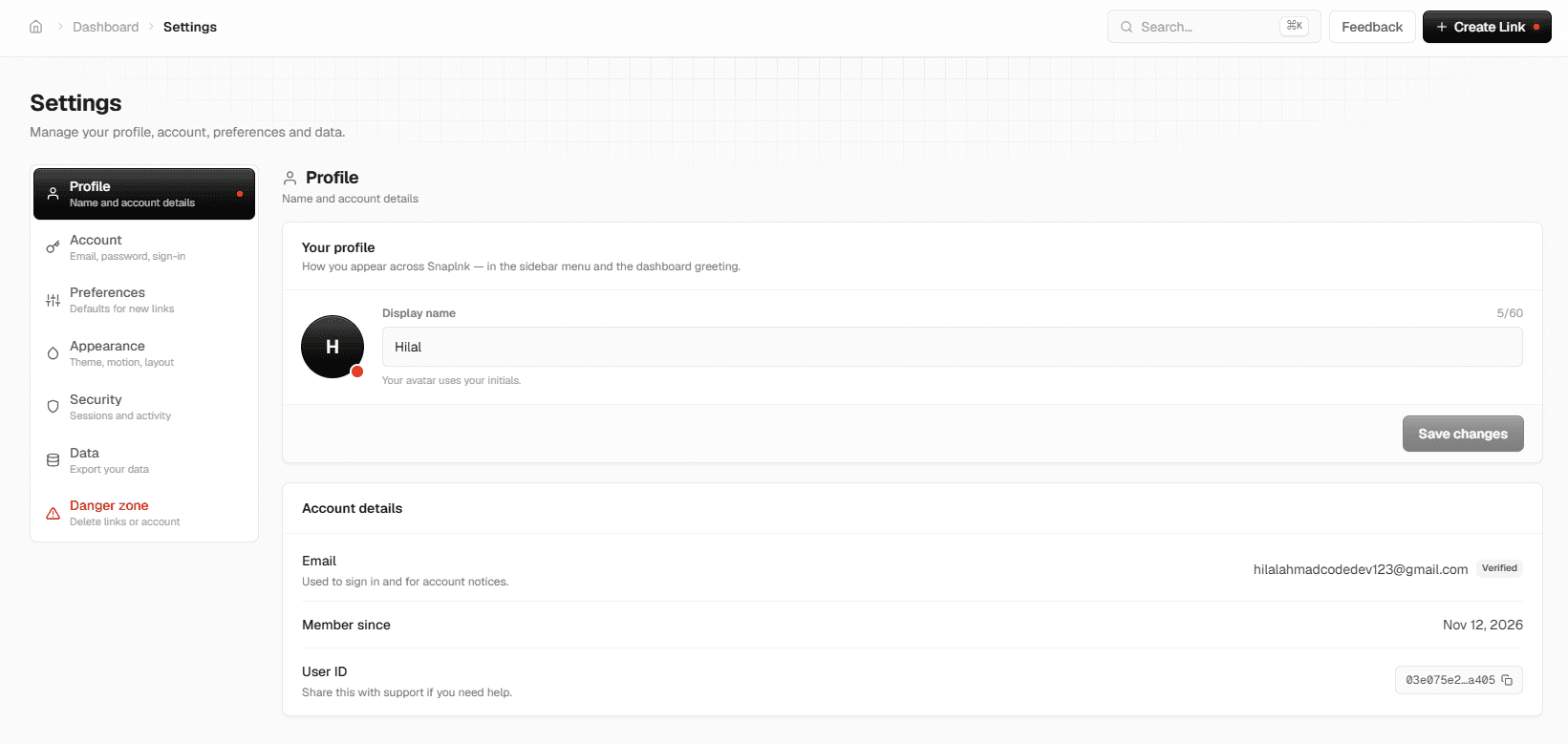
Tabbed settings: Profile (display name, initials avatar), Account (email, password, sign-in methods), Preferences (defaults for new links), Appearance (theme, motion, layout), Security (sessions and activity), Data (export) and a Danger zone for deleting links or the whole account — self-service, through the delete_my_account SQL function.
Admin panel
A separate, noindexed area at /admin with its own sign-in, sidebar and theme switch (light / dark / default). It has seven sections: Overview, Users, Links, Bio pages, Events, Errors, Feedback and Audit log, with CSV export for users, links and events. Admin traffic is excluded from every number.
Overview
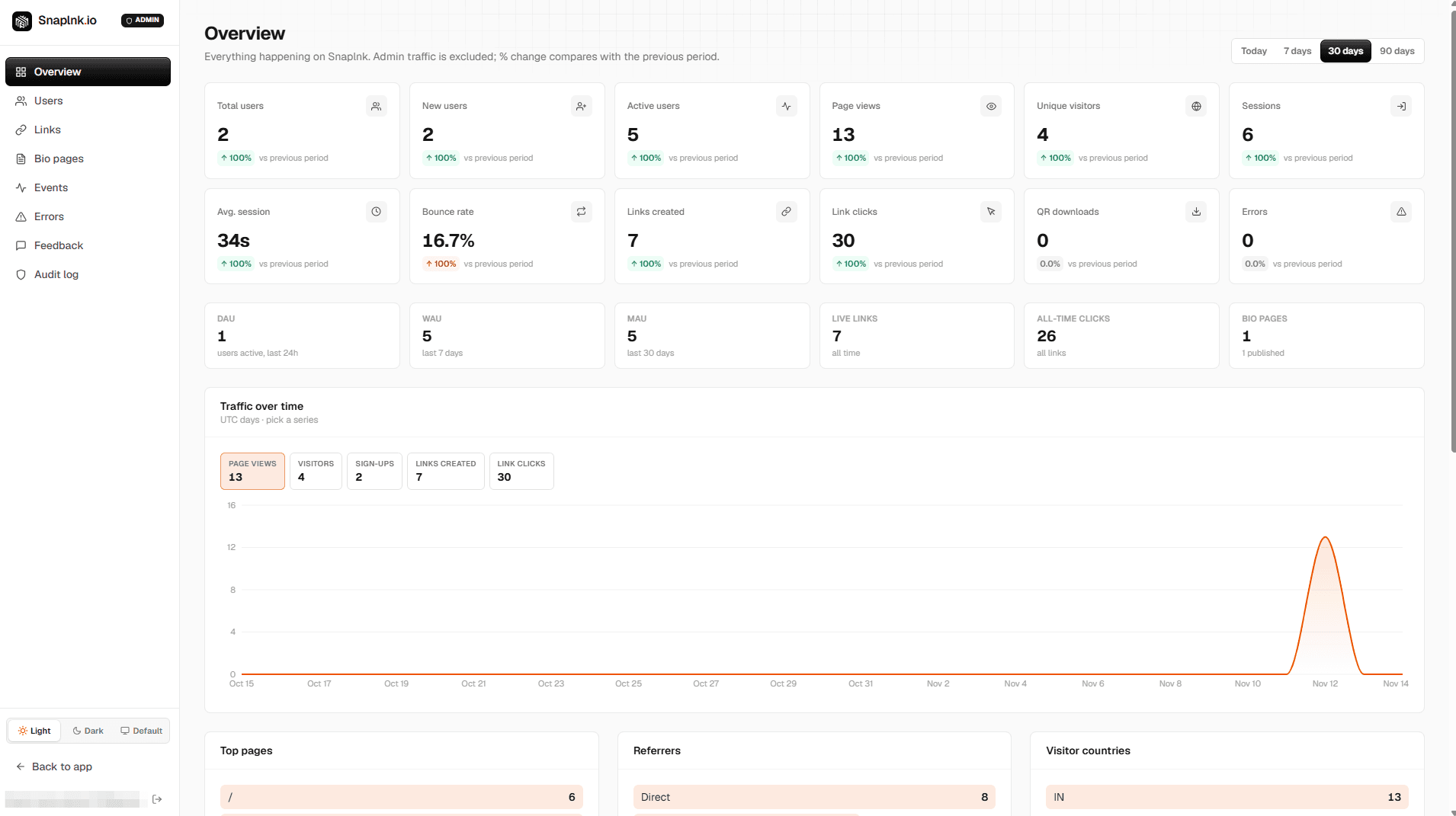
Twelve KPI cards, each compared with the previous period — total users, new users, active users, page views, unique visitors, sessions, average session length, bounce rate, links created, link clicks, QR downloads and client errors — plus DAU / WAU / MAU, live links, all-time clicks and published bio pages.
A “Traffic over time” chart switches between page views, visitors, sign-ups, links created and link clicks across Today / 7 / 30 / 90 days, followed by top pages, referrers and visitor countries. All of it comes from three SQL functions (admin_overview, admin_timeseries, admin_breakdown) cached for 60 seconds.
Users
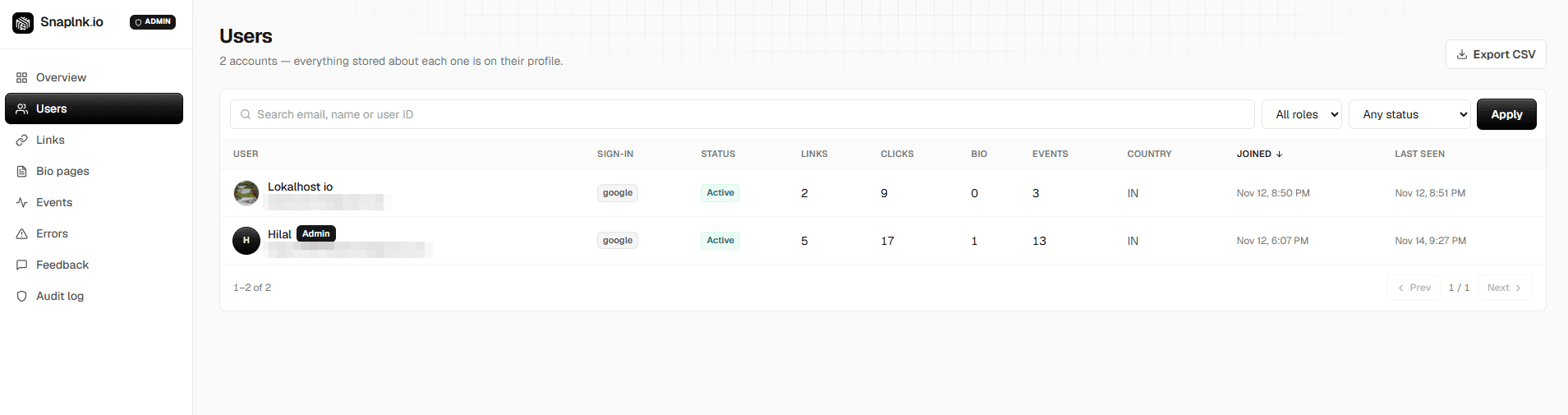
Every account with its sign-in method, status, link / click / bio / event counts, country, join date and last seen. Search by email, name or user ID; filter by role and status; ban, change role or export to CSV. Each user has a detail page with everything stored about them.
Links
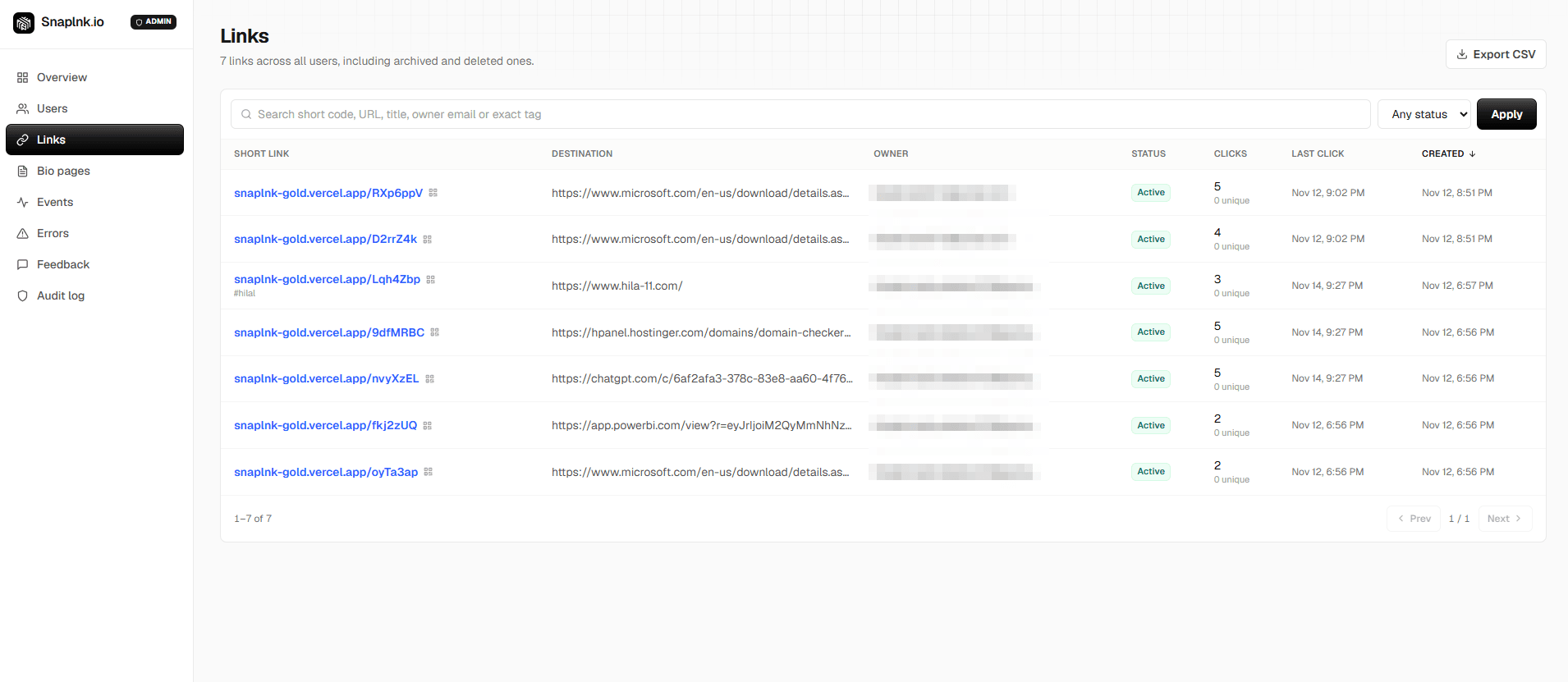
All links across all users, including archived and deleted ones — short link, destination, owner, status, clicks (with unique visitors), last click and created date — searchable by short code, URL, title, owner email or exact tag.
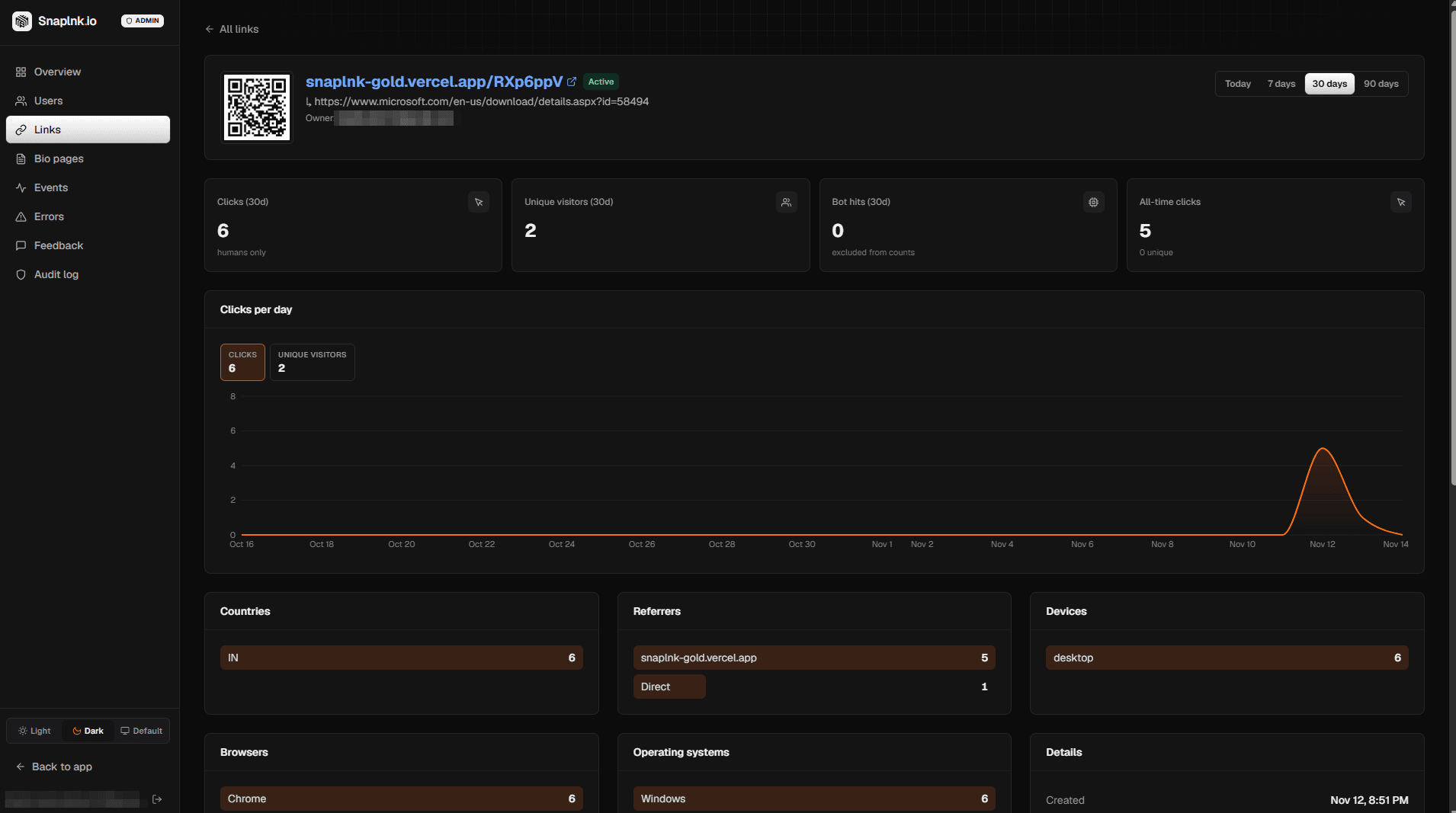
Opening a link shows its QR code, owner and destination, then clicks (humans only), unique visitors, bot hits — excluded from counts — and all-time clicks, a clicks-per-day chart, and breakdowns by country, referrer, device, browser and operating system.
Audit log
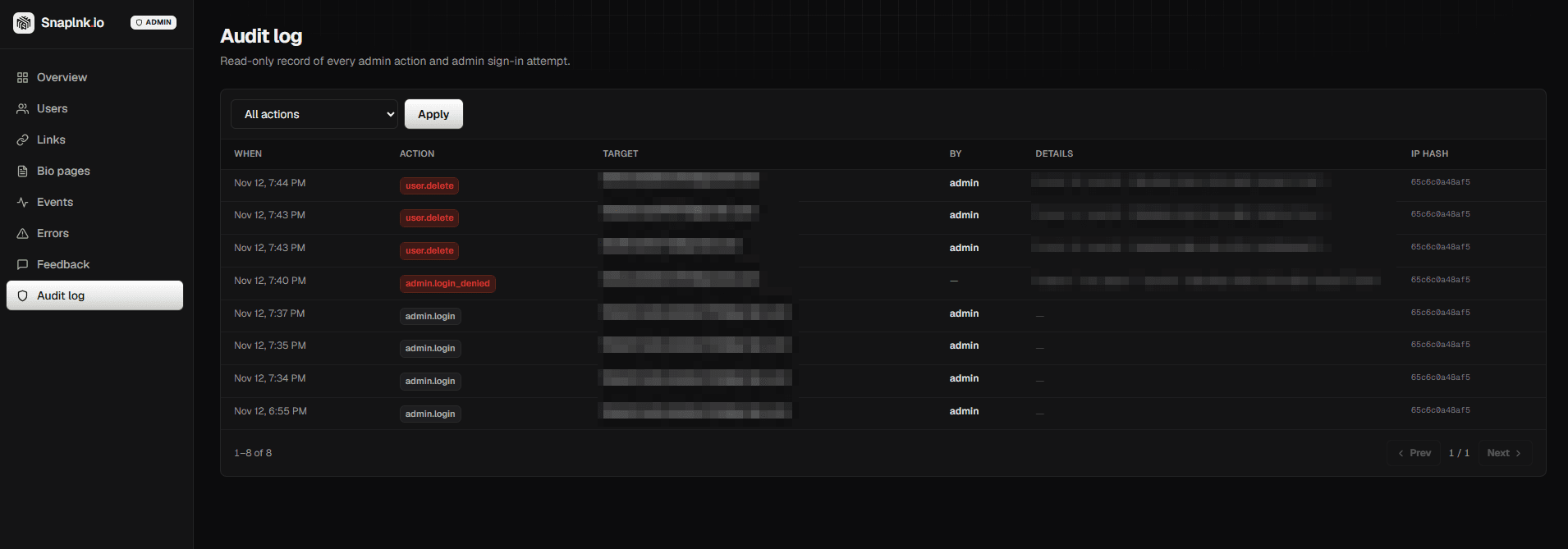
A read-only, append-only record of every admin action and every admin sign-in attempt — including denied ones (admin.login_denied with reason: not_admin). Each row stores when, the action, target, who did it, JSON details and a hashed IP.
Architecture
One Next.js 16 app on Vercel handles the landing page, dashboard, public redirects, bio pages, admin panel and all APIs. Supabase Postgres is the single source of truth, guarded by Row-Level Security and SECURITY DEFINER functions.
Tech stack
| Layer | Choice | Why |
|---|---|---|
| Framework | Next.js 16 App Router, React 19 | Route handlers, server actions, after() for post-response work, and proxy.ts (the Next 16 replacement for middleware) |
| Styling / UI | Tailwind CSS v4 (OKLCH tokens), shadcn/ui base-nova, @base-ui/react, Motion | Accessible primitives with light and dark themes |
| Auth | Supabase Auth via @supabase/ssr (email, Google, GitHub) | Cookie sessions usable in the proxy, server components and route handlers |
| Database | Supabase Postgres with RLS, RPC functions, monthly partitions for bio events | Ownership rules enforced in the database, not just in code |
| File storage | Supabase Storage (bio assets), Cloudinary (QR PNGs) | Owner-scoped storage policies; CDN-hosted QR images |
| Rate limiting | Upstash Redis + @upstash/ratelimit (sliding windows) | Works across serverless instances |
| Short codes | nanoid — 7 chars from a 57-character unambiguous alphabet (no 0/O, 1/l/I) | Readable codes, about 1.9 trillion combinations |
| Click parsing | ua-parser-js, isbot, @vercel/functions geolocation | Device, browser, OS, country and city without a paid IP database |
| Validation | Zod v4 | One schema shared by forms and route handlers |
| Charts | Recharts | Sparklines, area charts, admin time series |
| Testing | Vitest + Node scripts against Supabase | Unit tests for pure rules; RLS tests against a real database |
| Review | CodeRabbit | Automated review on each pull request |
Folder structure
snaplnk.io/
├── app/
│   ├── page.tsx                 landing page
│   ├── [shortCode]/route.ts     GET /:code → 302 redirect + click logging
│   ├── (auth)/signup/           email + Google + GitHub auth UI
│   ├── auth/                    server actions, OAuth callback
│   ├── bio/[username]/          public bio pages
│   ├── dashboard/               links, analytics, qr-codes, bio-pages, archived,
│   │                            expired, deleted, tags, domains, profile, settings
│   ├── admin/                   login, logout, (panel)/ users, links, bio-pages,
│   │                            events, errors, feedback, audit
│   ├── api/
│   │   ├── links/               list, create, [linkId] get/patch/delete
│   │   ├── analytics/overview/  daily clicks for charts
│   │   ├── bio/                 pages CRUD, publish, unpublish, username-check
│   │   ├── track/               first-party analytics intake
│   │   ├── feedback/  account/delete/
│   │   └── admin/               users, links, events (+ CSV export)
│   └── pricing/  faqs/  privacy/
├── components/
│   ├── landing/  dashboard/  admin/  analytics/
│   ├── bio/                     BioRenderer (public page renderer)
│   ├── dashboard/bio/editor/    BioEditor, BlockList, DesignPanel
│   └── ui/  theme/  providers/
├── lib/
│   ├── bio/                     blocks, themes, templates, embeds, contrast,
│   │                            reserved names, publish checks, plans, vCard
│   ├── admin/                   access, session, requireAdmin, queries, audit, CSV
│   ├── analytics/               client tracker, events, server, IP hashing
│   ├── validators/              url.ts (SSRF/phishing checks), link schemas
│   ├── utils/                   short codes, QR, Cloudinary, click parsing
│   ├── supabase/                browser, server, admin, middleware clients
│   └── ratelimit.ts  redis.ts  safeNext.ts  authErrors.ts  account.ts
├── supabase/
│   ├── migrations/              bio pages, bio RPCs, delete account,
│   │                            admin analytics, admin queries
│   └── tests/                   RLS and RPC test scripts
├── proxy.ts                     auth refresh, admin gate, route protection
├── vitest.config.ts
└── .coderabbit.yaml
Deep dives
A. Link creation and the redirect path
Creating a link runs six guarded steps. Serving a link is a single indexed lookup followed by a 302, with logging pushed off the hot path. The database insert is the one place that decides uniqueness.
Create — POST /api/links
- 1Authenticate and rate-limit firstReject anonymous users (403) and rate-limit before any parsing: 5 requests per 10 s burst, then 100 per hour per user (Upstash sliding windows).
- 2Clean the metadataTitle up to 200 chars, up to 20 unique tags of 40 chars each, and an expiry that must be in the future.
- 3Validate the destination
lib/validators/url.ts: http/https only, max 2,048 chars, no embedded credentials, no localhost, private, link-local or carrier-grade IP ranges, and no links pointing back at snaplnk.io itself. - 4Validate a custom alias3–30 chars of letters, digits, - or _, and not on the reserved list.
- 5Insert and let the database decideThe
UNIQUE(short_code)constraint is the judge. On a23505collision a random code is retried up to 5 times; a taken custom alias returns 409. - 6Generate the QR afterwardsOnly once the row exists: render the QR PNG, upload it to Cloudinary and save its URL. A QR failure never blocks the link.
Redirect — GET /:shortCode
increment_clicks RPCB. Bio pages: a safe, versioned page builder
Bio pages are stored as JSON blocks (schema version 1), validated by Zod on the client, the API and the renderer.
- Draft vs published. The editor writes to
draft.bio_publish_pagesnapshots draft + profile + theme intopublishedatomically, guarded by the draft version so a stale browser tab cannot publish old content. - No user HTML. Embeds are parsed into a provider + id and the iframe URL is rebuilt from an allowlist (YouTube nocookie, Vimeo, Spotify, SoundCloud). Social handles are turned into safe outbound URLs.
- Accessible themes. WCAG 2.x contrast helpers check user-picked colours; pre-publish checks separate blocking errors from warnings.
- Usernames. A live availability RPC returns available, taken, reserved or invalid; a username history table records changes.
- Reserved names. One list blocks app routes, infrastructure names and impersonation terms (anything containing “snaplnk”) for both usernames and link aliases. A unit test fails if the TypeScript list and the SQL seed drift apart.
- Analytics at scale.
bio_eventsis partitioned by month with an auto-creating partition function, plus abio_daily_statsrollup. - Plans as config.
lib/bio/plans.tsholds every limit (pages, blocks, gallery images, image size, retention) in one place; today bio pages are free.
C. First-party, privacy-safe analytics
Product analytics are self-hosted instead of using a third-party script.
- The browser tracker batches typed events and sends them with
navigator.sendBeacon(with afetch keepalivefallback); it can never throw or block the UI. POST /api/trackalways answers 204 immediately and writes after the response withafter().- It drops oversized or invalid payloads, bots, Do-Not-Track / Global Privacy Control visitors, rate-limited clients and (by default) admin traffic.
- Raw IPs are never stored. They become a SHA-256 hash with a salt that rotates daily, so hashes cannot be joined across days.
- Client timestamps are only trusted within one hour; client errors are fingerprinted and grouped in
error_log.
D. Admin panel with layered security
The admin area is protected by four independent checks, all funnelling into one pure, unit-tested function — evaluateAdminAccess.
- 1Identity from env only. Admins are the verified emails in
ADMIN_EMAILS; removal takes effect immediately. - 2Role sync on every sign-in. The role is mirrored into
app_metadata, which users cannot edit; banned accounts are refused. - 3Separate admin session.
/admin/loginissues a signed cookie (userId.issuedAt.hmac, Web Crypto) valid for 7 days, independent of the normal Supabase session. - 4Re-checked everywhere.
proxy.ts, the/adminlayout, every admin API and server action callrequireAdmin()again. Non-admins hitting admin APIs get a plain 404, and every admin page sendsX-Robots-Tag: noindex.
Every admin action and denied login is written to the append-only audit_log. URL params are parsed with Zod .catch(), so a hand-edited URL can never break a page.
E. Auth and account lifecycle
Supabase handles email / password and OAuth. safeNext() only accepts same-site paths, so ?next= cannot be used as an open redirect, and the proxy recovers sign-ins that Supabase drops on the Site URL (/?code=). Users can delete their own account through the delete_my_account SQL function.
Challenges and how I solved them
The hardest problems were keeping a public shortener from becoming an abuse tool, generating unique codes correctly under Row-Level Security, and letting users build public pages without opening an XSS hole.
1. Unique short codes under Row-Level Security
Problem. The obvious approach — SELECT to check if the code exists, then INSERT — silently failed: RLS hides other users' rows, so the check always said a code was free. It is also a race between two requests.
Fix. Drop the pre-check and let the database's UNIQUE(short_code) constraint decide. A random code that hits error 23505 is regenerated up to 5 times; a taken custom alias returns a clear 409. With a 57-character alphabet and 7 characters there are ~1.9 trillion codes, so retries are rare.
2. Stopping abuse of a public URL shortener
Problem. Shorteners are used to hide phishing links, scan internal networks and spam the service.
- Dangerous destinations.
validateDestinationUrlallows only http/https; blocksjavascript:,data:andfile:, embedded credentials (google.com@evil.com), localhost, private and link-local IP ranges, single-label intranet hosts, and links back to snaplnk.io (redirect loops). - Scripted flooding. Upstash sliding-window limits (5 per 10 s burst, 100 per hour per user), applied before any parsing or database work, with standard rate-limit headers.
- Redis outages. An explicit policy: guests fail closed (reject), signed-in users fail open (allow), development always allows. The admin limiter falls back to an in-memory window.
- Anonymous links. Guest links (30-day expiry, IP-keyed limits) were too easy to abuse. Since 12 Nov 2026 link creation needs a real account, and a signed-out visitor goes through sign-up straight into the create form with the URL pre-filled.
- Impersonation. A reserved-name list for aliases and usernames, including anything containing “snaplnk”.
| Who | Redis is down | Why |
|---|---|---|
| Guest | Fail closed — reject | Anonymous traffic is the main abuse vector |
| Signed-in user | Fail open — allow | A real account is accountable; don't punish users for an outage |
| Admin | In-memory window | Still limited, without depending on Redis |
| Development | Always allow | No Redis needed locally |
3. Fast redirects with accurate analytics
Problem. Logging device, geo and referrer for each click must not slow the redirect, and bots (link previews, crawlers) inflate counts.
Fix. The redirect returns the 302 while logging runs separately. isbot flags crawlers: they are stored for transparency but never increment the counter. Counts go through an atomic increment_clicks RPC instead of read-modify-write, unique visitors are counted through a hashed visitor id, and geolocation comes from Vercel's edge headers — no paid IP database.
4. Orphaned QR images
Problem. Generating the QR code first meant a failed insert left an unused image on Cloudinary, and a Cloudinary hiccup blocked link creation.
Fix. Insert the link first, then generate and upload the QR, then update the row. A QR failure is logged and the link still works. Deleting a link also deletes its Cloudinary image through the stored public id.
5. Letting users publish pages safely
Problem. A link-in-bio builder lets anyone publish content on my domain, which invites XSS, unreadable colour choices and race conditions between tabs.
- XSS. No user HTML anywhere. Embeds go through a provider allowlist and the iframe URL is rebuilt from an id.
- Stale tabs. Publishing is a single SQL function guarded by the draft version.
- No service-role key for bio. Privileged actions are
SECURITY DEFINERfunctions that check ownership themselves, RLS blocks anonymous users entirely, and a Node test script checks these policies against a real database. - Colour and design issues. Several rounds fixed theme colours and contrast; WCAG contrast helpers and pre-publish warnings now catch them.
- Too many templates. Five early templates (business, creator, developer, minimal, neon) were replaced by two focused ones — Link Hub and Contact Card — in pull request 9.
- Name lists drifting. A unit test compares the TypeScript reserved list with the SQL seed.
6. Auth redirects and open-redirect risk
Problem. OAuth sign-ins sometimes landed on the home page with a ?code= instead of finishing (31 Jul 2026), and the callback trusted the next parameter, which allowed redirects to other sites.
Fix. proxy.ts forwards any /?code=, token_hash or error_code to /auth/callback; safeNext() rejects absolute URLs, //host, backslashes and control characters, backed by unit tests (12 Nov 2026).
safeNext("/dashboard/links")        // → "/dashboard/links"   ✓ same-site path
safeNext("https://evil.com")        // → "/dashboard"          ✗ absolute URL
safeNext("//evil.com")              // → "/dashboard"          ✗ protocol-relative
safeNext("/\\evil.com")             // → "/dashboard"          ✗ backslash trick
safeNext("/foo\u0000bar")           // → "/dashboard"          ✗ control characters
7. Securing the admin panel
Problem. An admin panel with user bans, exports and raw events is the most valuable target in the app, and a single check in one place is easy to bypass.
Fix. Defence in depth: admin identity only from an env list of verified emails, role mirrored into non-editable app_metadata, a separate HMAC-signed 7-day admin session, re-checks in the proxy, layout, APIs and server actions, 404s for non-admins, noindex headers and an append-only audit log. The decision itself is one pure function with unit tests. Sign-up and UI fixes followed in pull requests 14 and 15.
8. Building on Next.js 16
Problem. Next.js 16 changed conventions — middleware.ts became proxy.ts, and after() replaces ad-hoc background promises — and most examples online target older versions.
Fix. I read the docs bundled in node_modules/next/dist/docs and kept routing rules (lib/bio/proxyRules.ts, lib/admin/proxyRules.ts) as pure functions so they can be unit-tested outside the framework.
9. Shipping large features as one solo developer
Problem. The work happened in two bursts (21 Jul – 1 Aug and 11–12 Nov 2026). An early 53-file merge (pull request 6) shipped features that did not show up in the UI, and it was hard to tell which change caused it.
Fix. I switched to small, focused pull requests (bio pages, bio UI, colours, dashboard CRUD, settings, admin panel, admin fixes), added CodeRabbit for automated review, and added Vitest so rules could be checked without clicking through the app.
Results, learnings and next steps
In about four months I took snaplnk.io from first commit to a full product — shortener, QR codes, analytics, a bio-page builder and an admin panel — with tests around every security rule.
What shipped
- Short links with custom aliases, tags, expiry, archive, soft delete and restore, plus auto-generated QR codes.
- Click analytics by day, device, browser, OS, country, city and referrer, with bot filtering.
- A free link-in-bio builder with 7 block types, 4 embed providers, 2 templates, theming and draft / publish.
- A first-party analytics pipeline and an admin panel with 7 sections, CSV exports and an audit log.
- 5 Supabase migrations (RLS policies,
SECURITY DEFINERfunctions, partitioned event tables) and ~97 Vitest test cases.
What I learned
- 1Let the database enforce invariants. Unique constraints and atomic RPCs beat application-level checks, especially under RLS.
- 2Design for abuse from day one. Validation, rate limits and reserved names are cheaper than cleaning up a blacklisted domain.
- 3Never render user HTML. Parse inputs into structured data and rebuild output from your own templates.
- 4Privacy can be a design constraint, not an afterthought: hashed, daily-salted IPs still give useful analytics.
- 5Put security decisions in pure functions so they can be unit-tested, then call them from every layer.
- 6Small pull requests are easier to debug than one large merge.
Next steps
- Wrap click logging in the redirect route with
after()so serverless platforms never drop it (/api/trackalready does this). - Add the
linksandclick_eventstables and their RLS policies to the migrations folder. - Password-protected links and a UTM builder (columns already exist).
- Custom domains, teams and API keys (pages already planned in the dashboard).
- Paid plans using the limits already defined in
lib/bio/plans.ts.